Cascaded video analytics. A console built for triage.
Panopti watches your ONVIF/RTSP cameras with cheap local stages and sends only closed activity windows to a vision-language model. Triage queue, forensic search, pursuit view, and tamper-evident case manifests. Pairs with Frigate or MediaMTX when you need continuous recording.
- Cameras
- Any ONVIF / RTSP
- Host
- 1 Linux box
- Analytics
- 3-stage cascade
- VLM calls
- ~1 per activity window
Three stages. Only closed activity windows reach a model.
Running an AI model on every frame of every camera is expensive and mostly wasted — most footage is empty hallways and still parking lots. Panopti uses a cascaded shape: a cheap motion gate watches every frame, a slightly heavier stage groups motion into short activity windows, and only those closed windows get sent to the AI for a description and a danger call. A feedback loop watches how often the AI keeps what it sees and nudges each camera's sensitivity up or down on its own, so you get useful metadata on the events that matter without paying for AI on the 95% of footage where nothing is happening.
The gate drops ~97% of sampled frames on typical demo footage. The segmenter collapses the remaining activity into a handful of tracks. Only those tracks reach the VLM — so model calls scale with real activity, not with frame count. Numbers are indicative on the bundled demo dataset; your pass rate will depend on your scene.
The same clip, before and after Stage 3.
Instead of a wall of unlabeled minutes, every closed activity window gets a title, a description, an object class and a danger chip - stamped onto the event and surfaced in the triage queue. The "after" panel is a live Gemini call on the same warehouse still — hit reload to re-run it.
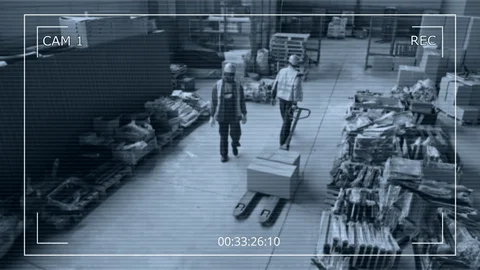
- Timestamp
- 00:33:26
- Camera
- Loading Bay 02
- Site
- Warehouse A
- Duration
- —
- Class
- —
- Summary
- —
- Danger
- —
Operators scrub. Search means eyeballs.
- Timestamp
- 00:33:26 → 00:33:38
- Camera
- Loading Bay 02
- Track window
- 12.3 s
- Object class
- —
- Title
- —
- Summary
- —
- Danger
- —
Ten minutes of camera, three events worth looking at.
Grey is idle - no VLM call is made. Coloured segments are the closed activity windows the cascade actually escalated. Hover any segment to see the metadata that got stamped onto that slice of the recording.
Hover a segment to see the VLM title, class and description that got stamped onto the clip.
Configure per-camera on the Cascade settings page: enable/disable the pipeline, tune the scene-diff threshold, idle timeout, max track duration and telemetry window - all validated client and server side. Numbers on this page are indicative on the bundled demo dataset; real savings depend on how busy your scenes are.
What this is, and is not.
Panopti is not a VMS or NVR. It does not record video continuously, enforce retention, or manage storage. It watches, triages, and investigates, and it indexes recordings your NVR produces. Wiring is documented in Setup.
It does not record continuously
The agent can register clips and the console plays them back, but there is no built-in 24/7 disk writer, retention enforcer, or storage pool manager. Panopti pairs with your NVR or VMS and indexes recordings it produces.
Use instead: Frigate or MediaMTX for continuous recording + retention; Panopti indexes the resulting clips.
It does not run dense object detection itself
The built-in cascade produces VLM-reviewed events for real activity (dangerous / suspicious / normal), which covers most alerting. If you need dense per-frame boxes for every person and vehicle - for ALPR, face search, or heatmaps - run a dedicated detector alongside the cascade.
Use instead: Frigate (Coral/GPU) or CodeProject.AI can post detections to /api/public/v1/detections; both pipelines coexist.
It does not do two-way audio
PTZ is supported; backchannel audio and intercom are not.
Use instead: go2rtc handles ONVIF backchannel today if you need it.
It does not enforce policy server-side
Toggling a policy in the UI marks it active, but evaluation against a live stream is a job for the cascade (dangerous/suspicious classes) or an external inference worker - Panopti stores the resulting events with their policy id.
Use instead: The built-in cascade for VLM triage, or Frigate zones/objects for detector-driven policy.
No life-safety claims
Panopti does not classify weapons or PPE and will not pretend to. It flags activity windows as dangerous, suspicious, or normal for an operator to review — that is a triage aid, not a detector.
Use instead: A purpose-built detector for weapons, PPE, gunshot, or fall detection if you need one.
See what operators actually use.
Real captures from the console against the bundled demo dataset - not mockups.
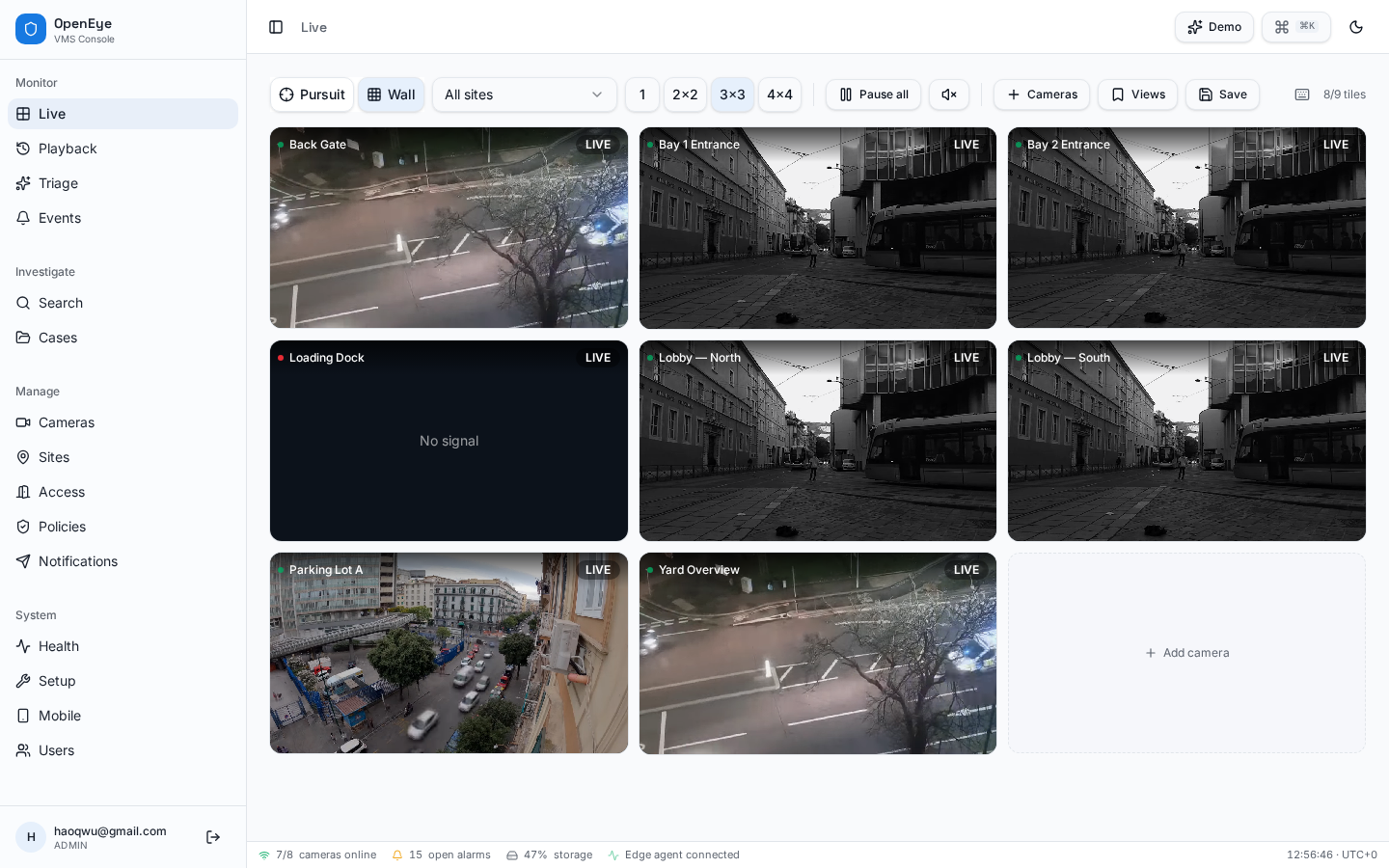
Spatial follow-the-suspect mode. Focus camera at the center, the 8 nearest cameras ringed around it by compass direction. Click any neighbor to recenter; the layout re-pivots in place.
Everything an operator needs to run a shift.
All of this works against the bundled demo data - no hardware required to evaluate the UX.
Cascaded analytics pipeline
Three-stage cascade on the agent + server: a downscaled scene-diff motion gate → a temporal activity segmenter → an AI review of the closed clip. Only closed activity windows reach the model, so the number of AI calls scales with real activity, not with frame count. Each camera's gate threshold auto-tunes toward a target pass rate based on how often the AI keeps what it sees.
VLM event review
Every cascade-generated event ships with a structured Gemini review: title, description, object class, and a dangerous / suspicious / normal chip - rendered inline in the triage queue for one-glance operator decisions.
Per-camera cascade settings
Admin dashboard to enable/disable the pipeline per camera and tune mv_threshold, idle_ms, max_track_ms and window_ms. All values are validated by a shared Zod schema on both the UI and the server, with cross-field checks (idle < max track, window ≥ max track).
Cascade telemetry
Agent posts gate-stat rollups every window. The settings page shows gated count, pass rate and VLM-kept count per camera, and returns the adapted threshold to the agent in the same response.
Pursuit view - spatial multi-cam
Follow a suspect across the camera mesh. Focus camera at center, the 8 nearest cameras placed by compass direction from your floor plan. Click any neighbor to recenter; Smart Handoff highlights the neighbor where fresh person/vehicle detections fire (requires a detector feed; see prerequisites).
Live workspace v2
1×1 / 2×2 / 3×3 / 4×4 grids, multi-select picker, saved views, sync play/pause/mute, per-tile digital zoom + pan, fullscreen, full hotkey set.
AI triage queue
Severity-coded inbox with VLM rationale, confidence, signal tag and zone. Acknowledge / escalate / resolve / dismiss in one key. Escalation fires notifications automatically.
Forensic search
Scrub the archive by object class, color, time, site and confidence. Thumbnails carry overlaid bounding boxes (requires a detector feed; see prerequisites) and deep-link straight to the moment in playback.
Investigations & evidence
Bundle clips, events and detections into cases. Generate signed JSON manifests with a deterministic SHA-256 over the case contents as a tamper-evident case manifest (video bundling in development).
Playback & timeline
24-hour scrubber with variable speed, recording-segment markers, and bookmark-to-case for the current frame range.
Maps & floor plans
Upload a floor plan per building level, calibrate scale, place each camera with yaw and FOV cone. The same geometry powers Pursuit's neighbor solver.
ONVIF discovery + onboarding
Guided 4-step wizard: pick a site, WS-Discovery scan on the LAN (run by the agent), vendor URL templates (Axis/Hikvision/Dahua/Reolink), ffprobe validation, save.
Built-in HLS streaming
The agent transmuxes each RTSP stream to LL-HLS on demand and signs short-lived URLs (HMAC). No separate re-streamer required for the live grid.
PTZ control
ONVIF ContinuousMove and preset recall from the live tile overlay; agent forwards commands to the camera.
Access control
Door registry plus an ingest endpoint (HID/Brivo/etc.) - badge events appear in the live access dashboard next to camera events.
Notifications fan-out
Per-channel routing for webhook and Slack. Severity thresholds, delivery log, and a manual dispatch button per triage event.
System health
Per-agent liveness, per-camera FPS / bitrate / codec, recording storage and disk usage - at a glance, with red/amber/green thresholds.
Policy catalog
9 signals (Intrusion, Tailgating, Loitering, Crowd, Vehicle-in-zone, Object-left-behind, Line-crossing, Zone-dwell, After-hours) with admin enable/disable toggles, evaluated on every reviewed activity window.
Auth, roles, RLS
Email + Google sign-in. First user is admin; everyone else is viewer. Row-level security on every table, camera credentials protected by column-level grants, per-camera view permissions enforced in RLS.
Operator chrome
Collapsible sidebar grouped by Monitor / Investigate / Manage / System, command palette (⌘K), live status bar, light/dark themes, mobile view.
What you need to bring.
For the quick start you only need a Linux box and our agent - that's enough to discover cameras, stream live, and run AI triage on seeded events. The other items are optional upgrades when you want continuous recording or your own inference pipeline.
Linux host
small server / NUC / mini-PCOne box to run the agent (and optionally Frigate). 4 cores + 8 GB RAM handles ~16 cameras of transmuxing¹; add a Coral USB or a small GPU only if you also want detection. ¹ remux only; enabling the cascade adds decode load per camera.
Panopti agent
required - bundled, single binaryHandles ONVIF WS-Discovery, ffprobe-based camera validation, RTSP→LL-HLS transmuxing with signed URLs, PTZ commands, snapshots and heartbeats. Generate a token and grab the docker-compose from /setup.
Recording (pairs with your NVR or VMS)
optional - only if you need long retentionPanopti indexes recordings (POST /api/public/v1/recordings) and plays them back, but does not write continuous 24/7 video to disk. Pair with an NVR for retention.
AI / object detection
optional - powers real (not seeded) triageIf you want the triage queue, forensic search and policies to fire from real video, run an inference worker that POSTs to /api/public/v1/events and /detections.
Reverse proxy + TLS
needed once you expose anything off the LANModern browsers require HTTPS for camera/microphone, WebRTC and Service Workers. The generated Caddyfile terminates TLS in front of the agent and console.
From zero to live grid in 10 minutes.
The minimum useful setup is: Panopti console + the Panopti agent on a Linux host. The agent discovers your cameras over ONVIF and transmuxes RTSP to LL-HLS that the browser can play directly.
- 1
Sign up and seed demo data
Open the console and create an account - the first user automatically becomes admin. Use the Demo menu in the top bar to seed sites, cameras, events and detections so every screen has data to show. No hardware required. - 2
Generate an agent token in /setup
Open Setup, click New token, then download the generateddocker-compose.ymlandCaddyfile. The bundle wires the agent to your console with a signed bearer token.# On your Linux box mkdir -p /opt/panopti && cd /opt/panopti # (drop the docker-compose.yml + Caddyfile downloaded from /setup here) docker compose up -d docker compose logs -f agent
- 3
Discover cameras on the LAN
In Cameras → Add camera, the wizard runs ONVIF WS-Discovery through your agent and lists every device it found. Pick one, enter credentials, and the agent'sGetProfiles/GetStreamUricalls auto-fill the RTSP URL. ffprobe validates the stream before you save. - 4
Turn on cascaded analytics
SetCASCADE=1on the agent and open Settings → Cascade to enable it per camera. The agent'scascade.mjsstarts ffmpeg with a scene-diff gate, opens tracks on motion, and posts closed tracks to/api/public/v1/agent/tracks— the server calls Gemini via the Lovable AI Gateway and inserts a reviewed event into the triage queue. Per-camera thresholds auto-tune from the telemetry the agent sends to/api/public/v1/agent/gate-stats.# agent .env CASCADE=1 OPENEYE_URL=https://vms.example.com OPENEYE_TOKEN=... # tune per camera in the console: Settings → Cascade # mv_threshold - lower = more sensitive (validated 0.1-128) # idle_ms - close a track after N ms of stillness # max_track_ms - hard cap on a single track # window_ms - telemetry rollup window
- 5
(Optional) Add Frigate for continuous recording + detection
Frigate happily consumes the same RTSP URLs and posts events back to Panopti. The /setup page also generates a starterfrigate-config.ymland a docker-compose service for it.# docker-compose.yml fragment (also generated for you in /setup) services: frigate: image: ghcr.io/blakeblackshear/frigate:stable devices: ["/dev/bus/usb:/dev/bus/usb"] # Coral environment: OPENEYE_URL: https://vms.example.com OPENEYE_TOKEN: ${AGENT_TOKEN} volumes: - ./frigate-config.yml:/config/config.yml:ro - /mnt/nvr:/media/frigate - 6
Wire notifications
In Notificationsadd a Slack incoming webhook or a generic HTTPS webhook with a severity threshold. Escalating any triage event will fan out to every matching channel with a delivery log. - 7
Put it behind TLS
The generated Caddyfile already terminates HTTPS atvms.example.comand proxies the agent + console. WebRTC and modern browsers require it.# Caddyfile (auto-generated) vms.example.com { reverse_proxy /api/agent/* agent:8787 reverse_proxy /hls/* agent:8787 reverse_proxy * openeye:8080 }
Reference architecture
  ┌─────────────────────┐  ONVIF/RTSP   ┌───────────────────────┐  LL-HLS  ┌───────────────────┐
  │  IP cameras (any)   │ ────────────► │  Panopti agent     │ ───────► │ Panopti console│
  │  Axis · Hikvision   │  WS-Discovery │  (single container)   │  signed  │ (this app)        │
  │  Dahua · Reolink    │ ◄──── PTZ ─── │  ffmpeg transmux      │  URLs    └─────────┬─────────┘
  └─────────────────────┘               └─────────┬─────────────┘                    │
                                                  │ webhook                          ▼
                                ┌──────────────── ┼ ─────────────┐         ┌───────────────────┐
                                │   Optional add-ons              │ events  │  Notifications    │
                                │   Frigate (recording + AI)      │ ──────► │  Slack/webhook    │
                                │   go2rtc, MediaMTX (re-stream)  │         └───────────────────┘
                                └─────────────────────────────────┘
Everything inside the agent box ships with Panopti. Frigate / go2rtc / MediaMTX are optional drop-ins when you want continuous recording or your own inference pipeline.
Ready to look around?
The console runs against demo data out of the box - first user becomes admin. Wire a real camera whenever you're ready.
Open the console